Build an AI Project Manager That Writes Reports — and Remembers Everything
Why perfect project memory, not faster typing, is the real upgrade for planning, reporting, risk and executive decision-making.
By Dr. Hassan Eliwa, PhD — Founder of PMMilestone.org & PMMilestone.com · 2026-06-28
Build an AI Project Manager That Writes Reports — and Remembers Everything
By Dr. Hassan Eliwa, PhD — Founder of PMMilestone.org & PMMilestone.com · Updated 2026-06-28 · https://pmmilestone.com/career-guides/build-an-ai-project-manager-that-writes-reports-and-remembers-everything
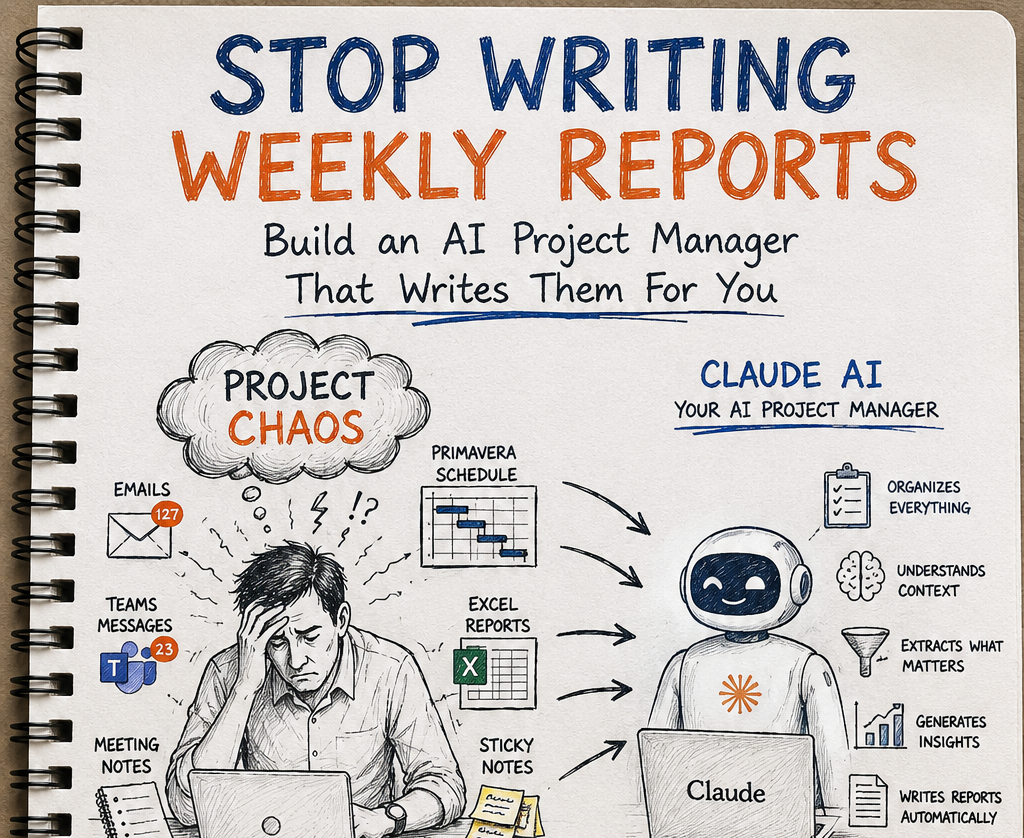
There is a particular silence that falls in a steering meeting when nobody can answer the question on the table. I have watched it happen on programmes worth more than a billion dollars. A director asks, calmly enough, why a work package has been slipping since February. The project lead opens their mouth, closes it, and offers the only honest reply available: “Let me come back to you on that.” Two days of digging through inboxes follow. The answer, when it finally arrives, is partial — because half the people who knew the story have already moved on.
I have spent more than two decades in planning and project controls, and I no longer believe the weekly report is our biggest time sink. It is a symptom. The disease is that projects forget. They forget decisions, the reasons behind them, the verbal commitments made on site, the early warnings raised and waved through, and the chain of small events that later becomes a major variance. The report is simply the weekly moment we are forced to confront how much has leaked away.
So this article is not really about getting AI to type faster. It is about building a project manager that remembers — and, almost as a by-product, writes the reports for you. If you work in construction, infrastructure, rail, energy, EPC, PMO, or a hybrid programme where software and field delivery intersect, that distinction matters. Better wording is nice. Better memory changes the quality of leadership decisions.
Reporting is the symptom; forgetting is the disease
Consider how knowledge actually behaves on a live job. A geotechnical surprise gets discussed on a Tuesday call. A permit condition changes by email. A precast supplier warns of a beam-delivery slip in passing. A subcontractor agrees a workaround in the site office that never makes it to formal minutes. Each of these is a thread in the story of why the project goes the way it goes — and each one is fragile. People rotate. Notebooks get filled and shelved. Teams chats vanish into a channel nobody revisits. The thread snaps.
That is why so many weekly reports feel exhausting. The task is not “write a summary.” The task is “reconstruct the truth from incomplete memory.” On one large civil programme, the Friday reporting scramble regularly consumed the planner, cost engineer, package manager and a site lead for half a day each. Not because the narrative was inherently hard, but because the source context lived in four inboxes, two spreadsheets, a baseline schedule, and a handful of undocumented verbal commitments.
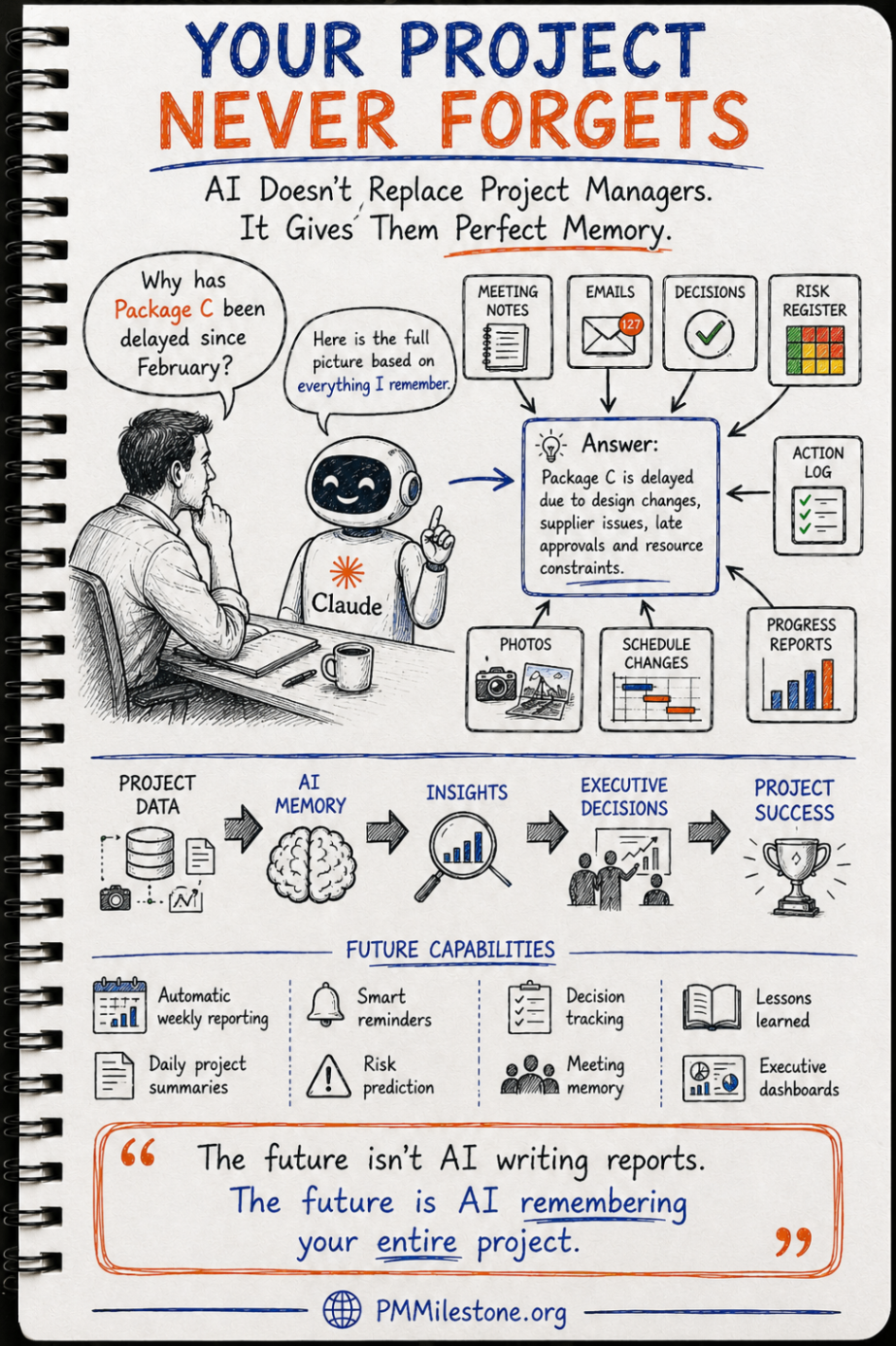
Figure 1 — What the project still remembers over time
| Project moment | Team-only memory | AI project memory | What this means in practice |
|---|---|---|---|
| Baseline month | 95% | 95% | Both the team and the system still hold the original intent clearly |
| First package handover | 70% | 94% | People move, but the linked record still preserves decisions and drivers |
| Mid-project turnover | 48% | 92% | Context loss accelerates unless capture has been continuous |
| Claim / audit period | 25% | 91% | Without project memory, teams reconstruct; with it, they retrieve |
Team-only memory collapses at each handover. A connected project memory holds the context close to intact for the life of the programme.
The handover cliff is real. On long programmes, the most expensive losses are not poured concrete or burnt hours — they are lost reasons. The clause interpretation that drove a logic decision. The assumption behind a procurement date. The promise a contractor made in March. A project memory flattens that handover cliff by passing on context, not just files.
The operating-system mindset: capture once, use forever
The mental model that fixes this is to stop treating each report as a fresh assembly job and start treating the project as an operating system. You capture information once — wherever it naturally occurs — and reuse it forever in whatever shape the moment demands. Raw inputs flow in: emails, Teams chat, meeting notes, site photos, the daily diary, Primavera updates, cost reports, risks, change logs, and action trackers. Finished outputs flow out: the weekly report, the executive summary, the risk register, the issue log, the action tracker, lessons learned, a look-ahead plan, and a decision log.
That shift also changes the economics of project administration. Instead of manually rebuilding the same story three times — once for the meeting minutes, once for the weekly report, and once for the board paper — the story is assembled once and then re-expressed. In software terms, it is a source-of-truth problem. In project controls terms, it is a governance problem. In practical delivery terms, it is the difference between Friday chaos and Friday confidence.
A pragmatic 12-week rollout
One reason AI initiatives stall is that teams try to roll out a finished future-state system all at once. That is not how this works on live projects. The sensible path is to start with one painful scope, prove value fast, and widen only once trust exists. In project-controls language, you need a pilot, evidence, controlled scaling, and clear governance gates.
Figure 2 — A pragmatic twelve-week rollout for an AI project manager
| Weeks | Phase | What you actually do | Proof point |
|---|---|---|---|
| 1–2 | Discovery & data audit | Map real sources and select one painful package or report | A narrow, defensible pilot scope |
| 2–3 | Stand up project memory | Connect notes, emails, schedule, actions and cost signals for that scope | One connected working context |
| 3–5 | Pilot weekly report | Generate, correct, compare and repeat until leadership trust rises | Visible hours saved and fewer gaps |
| 4–7 | Meeting & diary workflows | Add AI minutes, owner tracking and voice-note site diary capture | Actions stop drifting between meetings |
| 6–9 | Risk intelligence | Trend risks, approvals, email tone, progress drift and schedule movement | A risk caught early enough to act on |
| 8–11 | Executive dashboard | Surface SPI, CPI, S-curve, action status and health score on one page | Board-ready pack in minutes, not hours |
| 10–12 | Scale to programme | Standardise structure and roll across more packages | One memory model serving multiple teams |
The winning rollout is narrow, visible and operational. Start where the pain is already undeniable.
I have found that week three is usually the tipping point. Up to then, people see the system as “interesting.” The moment it produces a weekly report that is materially consistent with the schedule update, the cost story, and the meeting actions — and does it faster than the manual process — the conversation changes. At that point, you are no longer selling AI. You are demonstrating reliability.
The daily diary that writes itself
If you adopt only one habit from this article, make it the daily diary. On a motorway-widening job I worked, the single most valuable record we held was not the programme or the cost report — it was the contemporaneous site diary. When the extension-of-time case came, eleven months after a brutal winter period, the diary carried the day. And the diary is exactly the thing humans are worst at maintaining, because it competes with everything else screaming for attention on site.
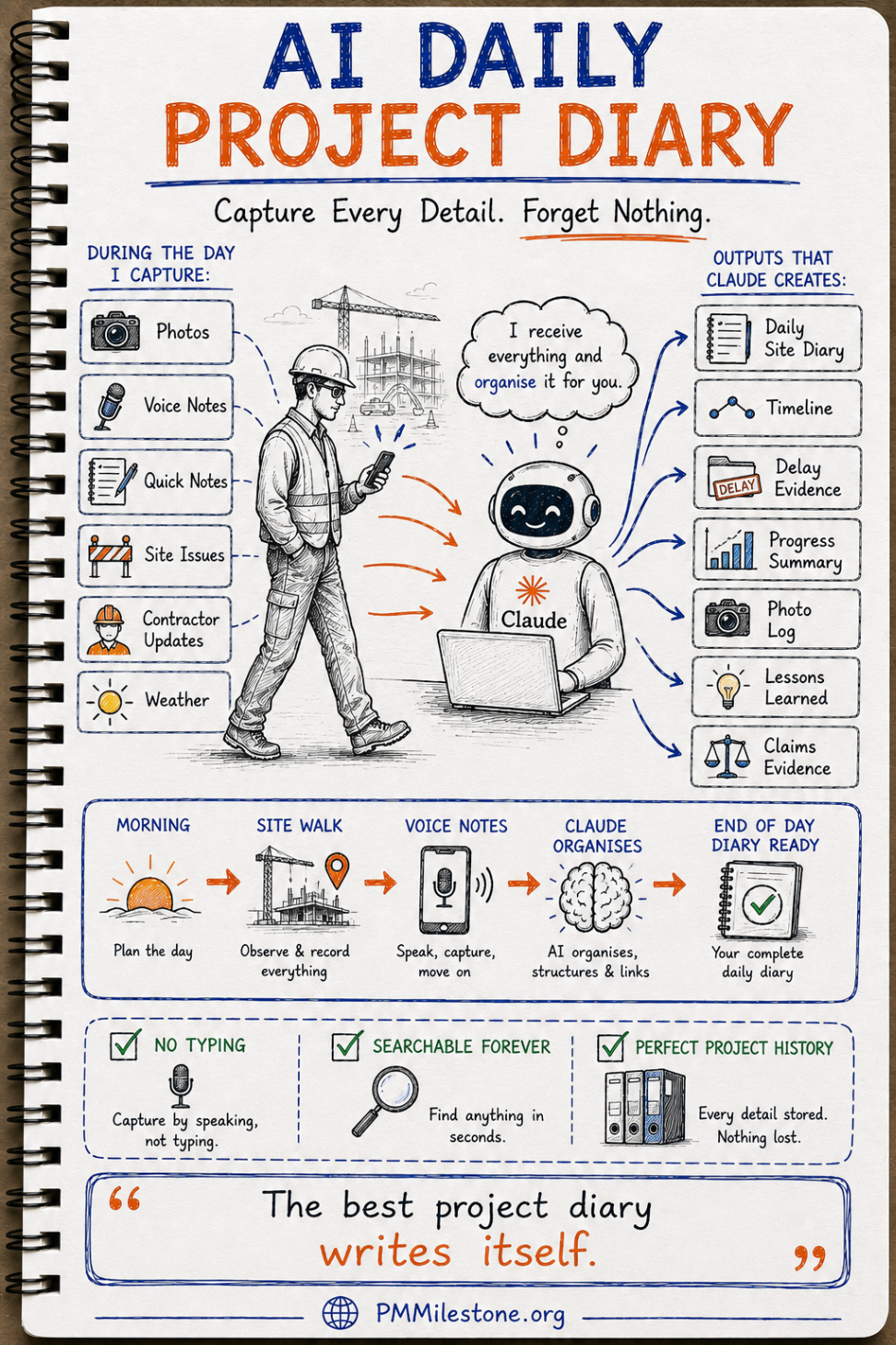
Every planner has promised themselves they will write up the day’s events that evening. On a busy job, that evening never comes — and the detail you needed is gone by morning. The reason a voice-note diary works is brutally practical: a thirty-second spoken note gets captured; a written one gets postponed into oblivion. Capture has to be easier than forgetting.
| During the walk | What gets captured | What the AI can produce |
|---|---|---|
| Photo | Progress, access, defects, weather context | Photo log, progress evidence, visual timeline |
| Voice note | Observed issue, verbal commitment, site instruction | Structured diary entry with timestamps and tags |
| Quick text note | Counts, quantities, missing resources | Traceable productivity and delay evidence |
| Weather capture | Conditions impacting workface productivity | Linked claim evidence and daily narrative |
Daily capture should feed multiple outcomes: not just a diary, but also claims evidence, timelines, progress summaries and lessons learned.
Field lesson: the best diary is not the most elegant template; it is the one people actually complete. In practice, that means fast capture on mobile, voice first, and automatic structuring afterward.
Minutes that assign owners, not just record words
Meetings are the other great memory leak. We generate decisions and actions in the room, then lose half of them by the time the minutes circulate — if they circulate at all. Let AI work from the transcript and the output can become a summary, an action register with named owners and dates, a decision log, and a drafted follow-up email ready before everyone leaves the room.
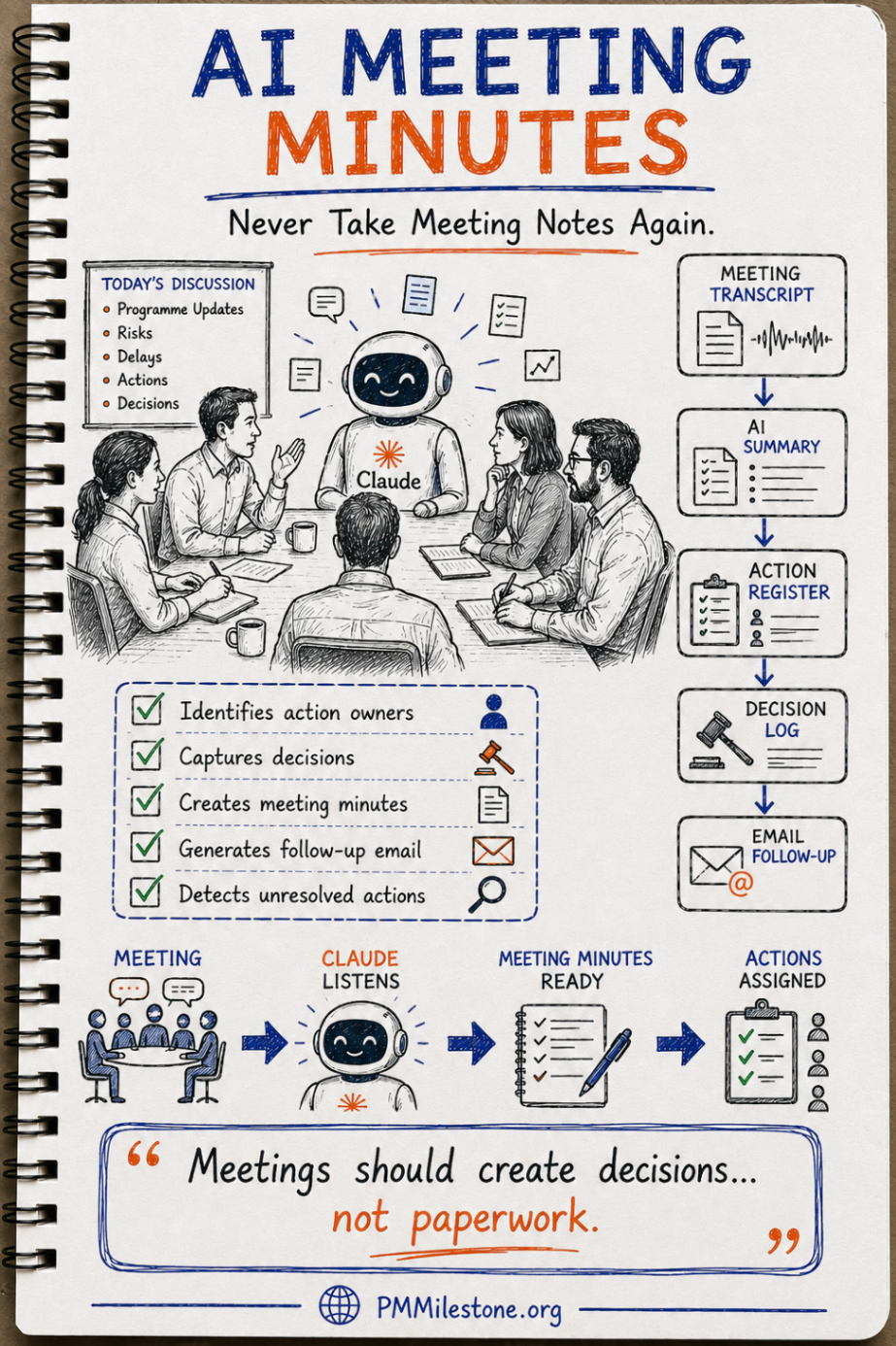
That matters because unresolved actions are one of the most common hidden sources of change-order escalation, late approvals, and recoverable delay. In hybrid construction-plus-digital programmes, where field delivery depends on software or controls integration, this is even more pronounced: one missed action between a commissioning team and a developer can slip a testing window by weeks. The system should therefore link meeting outputs not only to a minute, but to the action owner, target date, and current status.
Reading the signals before they become issues
Once project memory exists, risk management changes character. Instead of a register you revisit monthly and update from memory, you have a live system reading the project’s signals continuously: schedule changes, late approvals, budget variance, contractor issues, weather, the tone and volume of email traffic, repeated unresolved actions, procurement drift and rework patterns. Patterns that a tired human misses on Friday, a machine can flag on Tuesday.
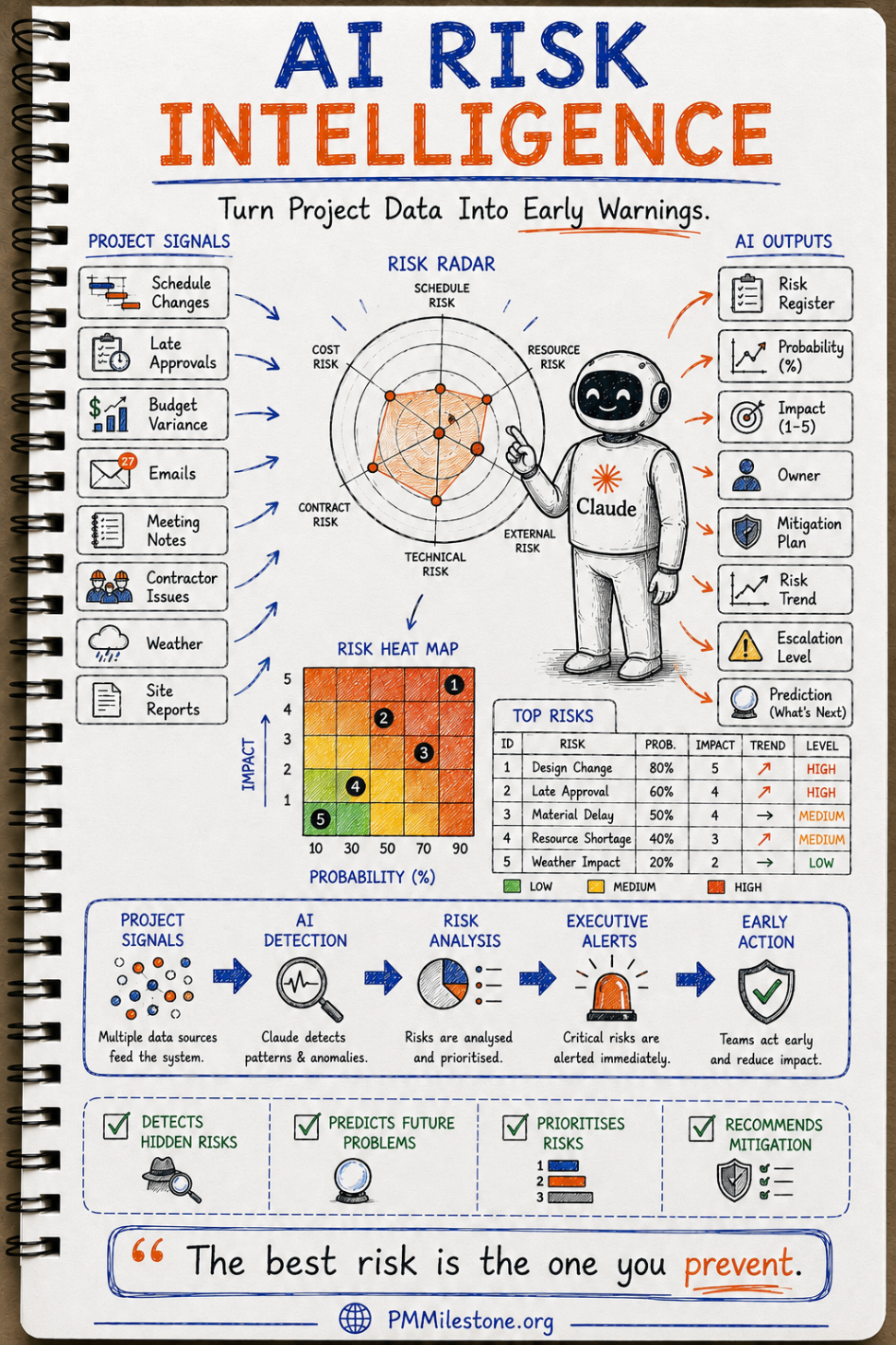
That does not mean surrendering judgement to automation. It means improving the input quality of judgement. The AI surfaces the pattern; the project team decides what it means. This is similar to how a schedule-health engine or a schedule quality checker works: it does not replace planner judgement, but it catches structural warning signs early enough to matter.
Figure 3 — Example early-warning risk view
| Risk | Probability | Impact | Trend | Why it surfaced |
|---|---|---|---|---|
| Precast beam delivery slip | 70% | 5 | Worsening | Supplier emails + missed fabrication milestones + transport dependencies |
| Consent / approval delay | 55% | 4 | Worsening | Decision backlog + aging approvals + repeated meeting carryovers |
| Traffic management constraint | 45% | 3 | Holding | Recurring workface conflict without closure |
| Subcontractor resource gap | 40% | 4 | Worsening | Lower output, higher overtime and rising missed handovers |
| Winter weather window | 30% | 2 | Easing | Forecast improving and exposure reducing |
The value lies in trend and explanation, not just in a coloured box on a heat map.
One screen the executives will actually read
All of this culminates in a dashboard that does for leadership what the diary does for site: it makes the whole picture available without anyone rebuilding it. Pulling from Primavera, Power BI, Excel, the daily diary, meeting notes, the risk register and cost reports, it renders earned value, the S-curve, cost and schedule performance, top risks, action status and a single health score on one page.
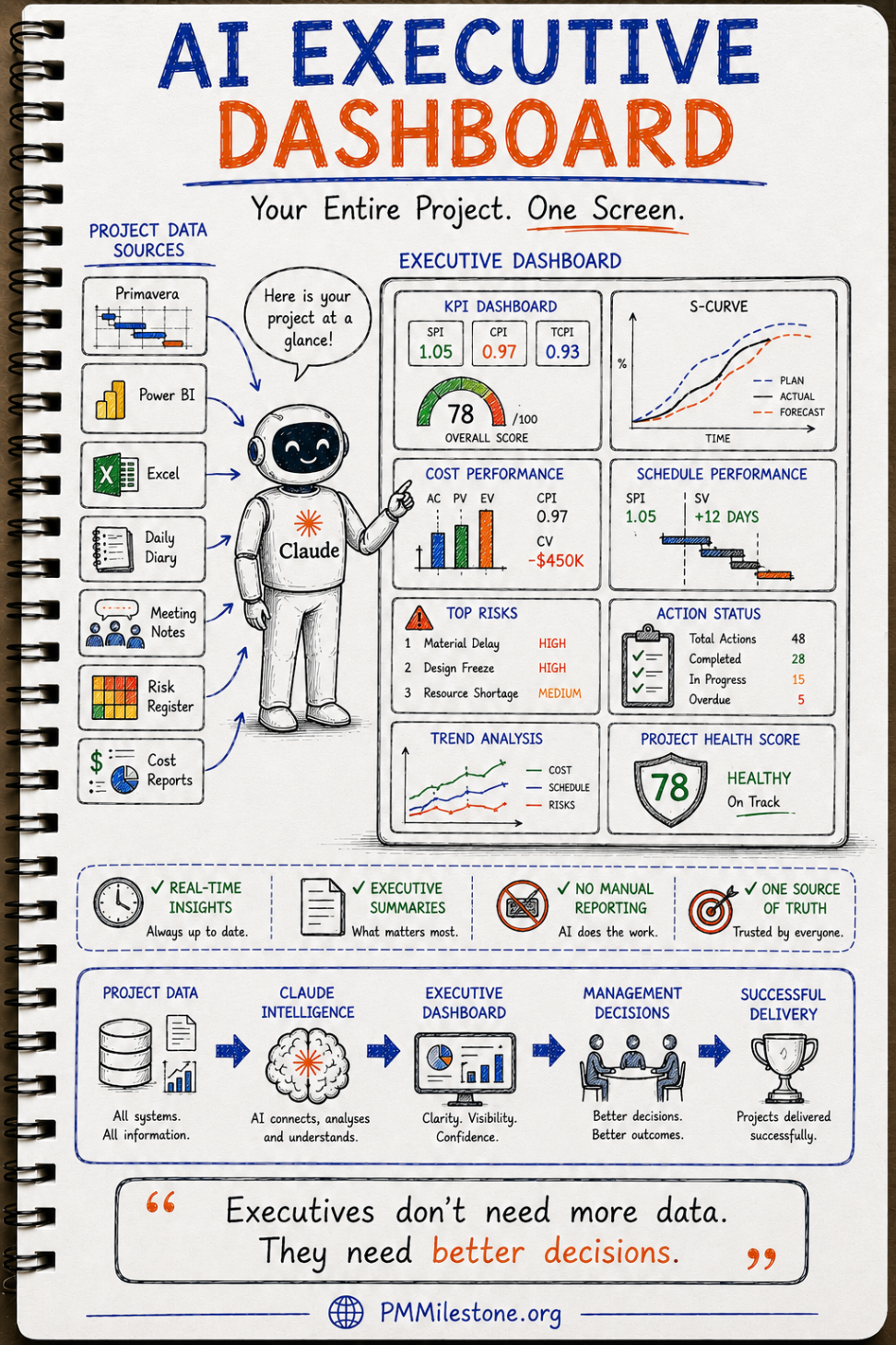
Executives do not need more data. They need faster access to defensible interpretation. On several programmes I have seen the board pack take longer to build than it took to read. That is a smell. The cure is not prettier charts. The cure is a connected source of truth behind them. For controls teams already working with CPI, EAC, earned schedule and trend analysis, the dashboard should simply present those concepts with less friction and better traceability. The EVM Calculator and related PMMilestone tools remain useful for checking and explaining the mechanics underneath.
Nothing gets replaced — your stack stays in charge
A fair concern is whether this means ripping out tools people already trust. No. The AI is a layer on top, not a replacement. Primavera P6 remains responsible for schedule logic and the critical path. Your cost tool remains the ledger of record. Power BI or your reporting environment remains the analytical surface. The AI layer connects, classifies, remembers, drafts and cross-references.
| Existing tool | Still responsible for | What the AI adds on top |
|---|---|---|
| Primavera P6 | Logic, relationships, baseline and update discipline | Narrative explanations, change tracing and multi-source context |
| Cost / ERP systems | Budgets, commitments, actuals and forecasts | Commentary, anomaly surfacing and cross-links to schedule causes |
| Power BI / dashboards | Analytics and visual KPI presentation | Auto-generated summaries, decision notes and board-ready briefing copy |
| Meeting platforms | Calls, transcripts and attendance | Minutes, owners, decisions, follow-up actions and searchable recall |
| Photo / field capture tools | Raw observations and evidence | Structured diary, tagged lessons, delay evidence and searchable history |
Think augmentation, not replacement. The systems of record stay authoritative.
What good governance looks like
Trust is what decides whether this becomes real operating infrastructure or a short-lived demo. That trust comes from governance. Teams need to know what sources are authoritative, how corrections are handled, who approves externally issued narratives, how personal data is treated, and how outputs are checked before issue. Helpful content and AdSense readiness both depend on this same discipline: the system must not produce vague, inflated or uncheckable claims.
- Define systems of record. The AI can summarise many things, but baseline dates, approved budgets and formal decisions must map back to named authoritative sources.
- Require human approval for issued outputs. Board papers, claims narratives and external reports should be reviewed by the responsible lead.
- Log corrections. If the report is edited, keep the learning so the next draft improves.
- Standardise before you scale. A consistent WBS, naming logic and risk taxonomy make one memory usable across many packages.
- Trend everything. Risks, action backlogs, cost variance and schedule drift all become more useful when the direction of travel is visible.
Common mistake: trying to scale before the language is standardised. If package naming, action ownership, discipline codes and risk categories are inconsistent, the memory layer spends its energy cleaning noise instead of producing insight.
And yes — it writes the weekly report for you
Once the memory is in place and the workflows are feeding it, the weekly report stops being a task. You ask for it, and it arrives — structured, traceable, consistent with the dashboard and the cost report, and grounded in the same facts every time. The 127 emails, contradictory spreadsheets and forgotten meeting notes collapse into a single calm request. That is the visible win, and it matters. But the deeper win is that the project becomes harder to confuse, harder to misremember, and easier to lead.
That is also why this approach has unusual value in both construction and IT/agile environments. On a physical project, it preserves the site reality needed for claims, handovers and executive control. On a software-heavy programme, it gives continuity across stand-ups, retrospectives, releases, defects, architecture decisions and delivery commitments. In both cases the core need is the same: retain context, surface signals, and reduce reinvention.
Key takeaways
- Start narrow, prove value, then scale. One painful package and one report in two weeks beats a year-long transformation programme that never lands.
- Make capture frictionless. Voice notes and transcripts win because they cost less effort than forgetting.
- Do not replace trusted systems. Keep P6, Power BI and cost tools in charge; let AI connect and remember on top.
- Focus on traceability. The output must be explainable back to real evidence if you want leadership trust.
- Reinvest the hours saved. Use the recovered time on recovery options, stakeholder strategy and better decisions — not on creating more admin.
Expert tips
Pilot on a report that already hurts. The fastest way to win sponsorship is not to show a futuristic demo; it is to remove pain from a live Friday workflow leadership already dislikes.
Link narrative to numbers. A dashboard without explanation is theatre. A narrative without traceable metrics is opinion. Keep both together.
Treat corrections as training data. Every time a planner or PM edits a draft, capture the reason. That is how the system becomes more useful instead of repeatedly making the same mistake.
Common mistakes
- Starting with enterprise scale instead of a narrow, high-pain pilot.
- Asking field teams to do more typing instead of making capture lighter.
- Letting the AI invent certainty where the underlying source is weak or disputed.
- Confusing a prettier report with a better operating model.
- Ignoring internal linking between decisions, actions, risks and schedule movement.
Continue reading on PMMilestone
- Encyclopedia foundations: Critical Path Method, Risk Management, Look-Ahead Schedule, Earned Value Management, Change Order Management.
- Career context: How to Become a Project Controls Engineer and From Scheduler to Project Controls Manager.
- Practical tools: EVM Calculator, SPI Calculator, CPI Calculator, and the Schedule Health Checker.
- Learning support: Project Controls Academy, Learning Tracks, and the PM glossary.
Frequently Asked Questions
Is this just a chatbot wrapped around my project files?
No. A chatbot answers one prompt at a time. The model described here is a connected project-memory layer that continuously captures, links and reuses context across reports, minutes, risks, diaries and dashboards. The difference is persistence, structure and traceability.Do I need to replace Primavera P6, Power BI or my cost system to do this?
No. In a sound rollout, those systems remain the systems of record. The AI layer sits on top to connect, summarise, cross-reference and explain what is already happening across them.What is the best first use case to pilot?
Choose the weekly report or package review that already causes visible pain. If leadership already knows it is slow, inconsistent or dependent on a few overstretched people, it is the easiest place to prove value quickly.Can this help with claims and delay analysis, or is it only for reporting?
It can materially help with claims readiness because contemporaneous records become easier to capture, structure and retrieve. It does not replace formal forensic analysis, but it improves the evidence base that methods such as time impact analysis or windows analysis rely on.How does this work on projects that mix construction delivery with software or controls integration?
Very well, provided the operating model respects both worlds. Construction inputs such as site diaries and look-aheads can sit alongside agile artefacts such as action logs, release notes and decision records, giving leadership one joined-up memory instead of two disconnected narratives.What is the biggest mistake teams make when trying to implement AI reporting?
They focus on the final report instead of the capture and governance underneath it. If the project memory is weak, the report will be weak — only faster. Start with source quality, structure and accountability.How do I convince a skeptical leadership team to try it?
Do not pitch the technology first. Pitch a result: hours saved on one live report, faster retrieval of decision history, fewer missing actions, and clearer alignment between dashboard, schedule and narrative. Skeptics are won by demonstrated outcomes on their own project.Will AI replace project managers or planners if this works well?
No. It should remove reconstruction work, not judgement. The more the machine handles remembering, structuring and drafting, the more valuable human leadership becomes in interpretation, recovery planning, stakeholder management and decision-making.
People also ask
Follow-up questions practitioners search for next — each one points to the calculator, template or reference entry that answers it.
Which schedule tool will an interviewer expect me to know?
Runs the DCMA 14-point assessment against P6 / MS Project exports. Schedule Health Checker ↗
Where do I look up the terms in this guide?
Single-line definitions for 1,200+ project-management and controls terms. PM Glossary on PMMilestone.org ↗
Which books deepen this career path?
Field handbooks on project controls, P6 scheduling and EVM. Books & Publications ↗
Which academy track maps to this career step?
Structured progression from planner to programme controls director. Project Controls Academy ↗