How Expert Planners Read a Primavera P6 Schedule in Just 10 Minutes
Why the best planners treat a programme like a radiologist treats an X-ray — five diagnostic layers that reveal a schedule's true condition long before the detail does.
By Dr. Hassan Eliwa, PhD — Founder of PMMilestone.org & PMMilestone.com · 2026-07-02
How Expert Planners Read a Primavera P6 Schedule in Just 10 Minutes
By Dr. Hassan Eliwa, PhD — Founder of PMMilestone.org & PMMilestone.com · Updated 2026-07-02 · https://pmmilestone.com/career-guides/how-expert-planners-read-a-primavera-p6-schedule-in-10-minutes
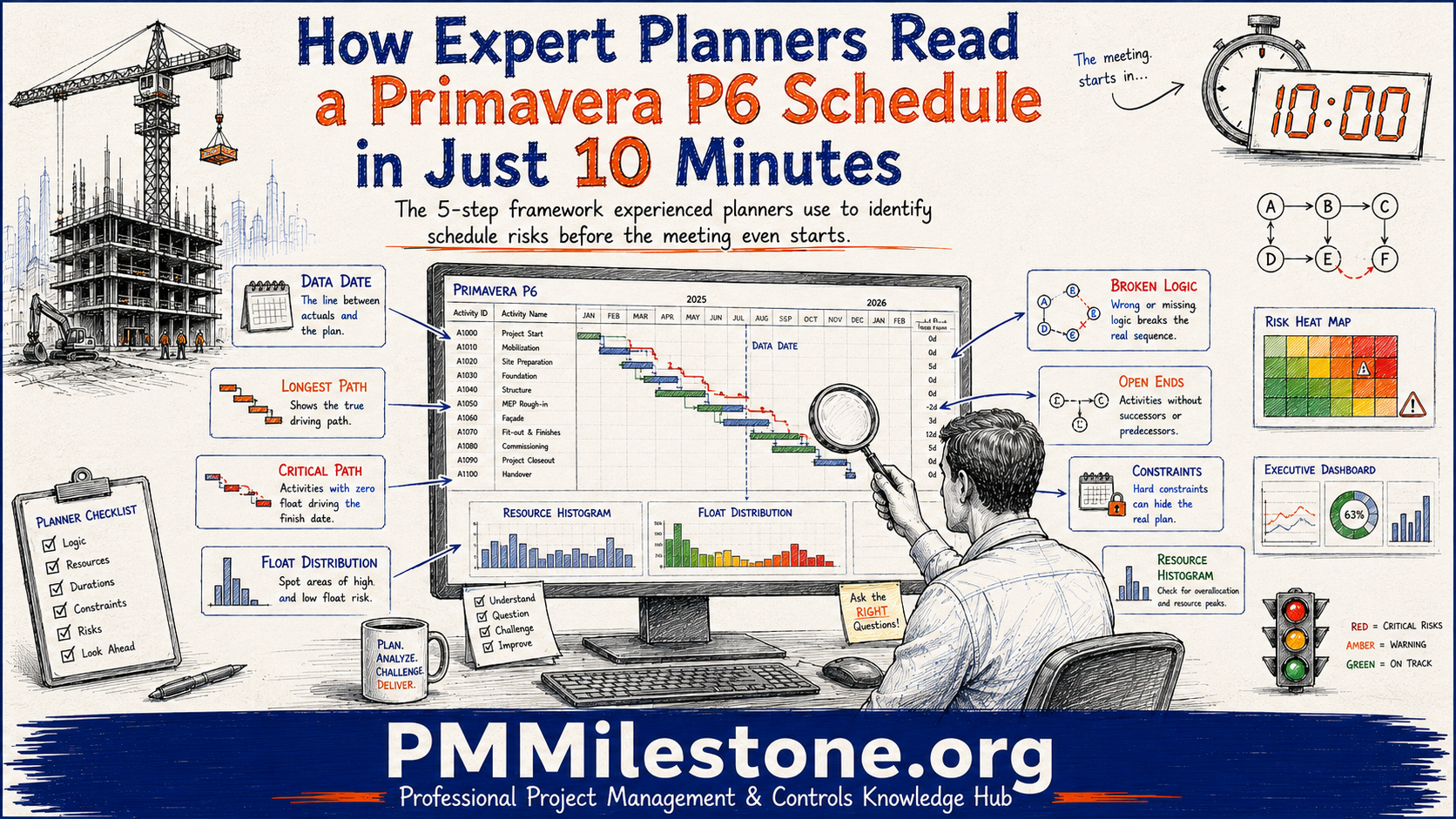
A radiologist does not read an X-ray pixel by pixel. They scan for the shapes that matter — the fracture line, the shadow that should not be there — and everything else fades into background. After two decades of tender adjudications and monthly progress reviews, I read a Primavera P6 programme the same way. The skill is not speed. It is knowing which shapes carry the diagnosis.
I was reminded of this during a competitive tender for an 8.4 km motorway widening package. Three contractors submitted programmes; two looked polished and one looked plain. The evaluation panel was leaning toward the prettiest bar chart. Ten minutes inside the actual P6 files reversed the ranking completely — the plain-looking programme was the only one with sound logic, and one of the "polished" ones was held together by fourteen hard constraints. That is what a disciplined ten-minute diagnostic buys you: the confidence to disagree with a good-looking printout.
The 5-Layer Schedule Health Check
Figure 1 — The five diagnostic layers, read from the skeleton outward
Resources & cost realism
Float distribution under load
Critical & near-critical paths
Logic, open ends, constraints
WBS, milestones, data date
Each layer only makes sense once the one beneath it checks out — always read bottom-up.
The mindset: pattern recognition, not line reading
New planners try to read a schedule by scrolling through activities. Experienced planners read it by layer, from the structural skeleton outward to the resource load. Each layer answers a single diagnostic question, and — crucially — a failure in a lower layer makes every layer above it meaningless. There is no point analysing float on a programme whose logic is full of holes, just as there is no point reading soft tissue on an X-ray until you have confirmed the bones. That ordering is the whole method.
Layer 1 — The skeleton: WBS, milestones, data date
Begin with structure. In roughly ninety seconds you can read the work breakdown structure, locate the contractual milestones, and — most importantly — find the data date. The data date is the programme's timestamp; it tells you where actual progress ends and forecast begins. If a contractor hands you a "current" programme whose data date is six weeks stale, you are not reviewing progress — you are reviewing history dressed up as a forecast.
Figure 2 — Sample P6 Schedule: 8.4 km Motorway Widening
| Activity | Start (day) | End (day) | Type |
|---|---|---|---|
| Site establishment | 0 | 20 | Non-critical |
| Earthworks — Cut A | 15 | 85 | Critical path |
| Drainage & culverts | 75 | 115 | Critical path |
| Bridge 3 — piling | 60 | 100 | Near-critical (30 d float) |
| Bridge 3 — deck | 100 | 150 | Near-critical (30 d float) |
| Pavement subbase | 110 | 165 | Critical path |
| Asphalt & surfacing | 165 | 185 | Critical path |
A simplified P6 view of the motorway package. Red rows are the driving path; the amber bridge activities carry 30 days of float.
The WBS itself is diagnostic. A clean, discipline-based breakdown (earthworks, drainage, structures, pavement, surfacing) signals a planner who thought in terms of how the job is built. A WBS organised purely by month or by cost code often signals a programme built to satisfy a reporting template rather than to model the works.
Layer 2 — Circulation: logic and open ends
Logic is the circulation system of a programme — if it does not connect, nothing flows. Run three quick tests: count the open ends (activities missing a predecessor or successor), count the constraints, and scan for oversized lags. On the motorway tender, the losing programme had 22 open ends and 14 hard constraints. Those constraints were not scheduling — they were the planner manually forcing dates the logic could not produce on its own.
| Logic check | Healthy signal | Warning signal |
|---|---|---|
| Open ends | Only true start / finish milestones | Dozens of dangling activities |
| Constraints | A handful, mostly "Start On or After" | Many hard "Finish On" constraints |
| Relationship types | Mostly Finish-to-Start | Heavy reliance on SS/FF with lags |
| Lags | Short, justified, few negative | Long lags hiding unmodelled work |
⚠ Common mistake — confusing a hard constraint with a plan. A "Finish On" constraint on completion makes the programme report the date the contractor wants, not the date the logic produces. On a marine wharf project I reviewed, removing a single completion constraint pushed the forecast finish out by nine weeks — the logic had been saying so all along, quietly, underneath the constraint.
Layer 3 — Pressure points: the critical and near-critical paths
With logic confirmed, trace the driving path. I use the Longest Path view rather than total-float filtering, because constraints distort float but not the longest chain of driving logic. Then read the path as a build narrative: "earthworks in Cut A drive drainage, which drives pavement subbase, which drives surfacing, which drives opening to traffic." On a linear project like a road, the driving path should broadly follow the chainage — if it jumps around the alignment illogically, the sequencing is suspect. See our Critical Path Method entry for the underlying theory, and near-critical path for what watches to keep alongside it.
Do not stop at the critical path. The near-critical activities — the amber bridge works above, carrying only 30 days of float — are where projects actually slip. A single wet-weather month on the bridge deck consumes that float and promotes the bridge onto the critical path. Experienced planners spend as much attention on what is about to become critical as on what already is.
Figure 3 — 60-Second Quality Scan (score out of 100)
| Dimension | Healthy benchmark | Schedule in hand | Gap |
|---|---|---|---|
| Logic completeness | 95 | 72 | −23 |
| Few hard constraints | 90 | 45 | −45 |
| Critical path test | 92 | 58 | −34 |
| Data-date currency | 95 | 88 | −7 |
| Float distribution | 88 | 65 | −23 |
| Resource realism | 85 | 70 | −15 |
The gap on "critical path test" and "few constraints" is exactly what the constraint problem looks like on a quality scan.
Layer 4 — Vital signs: float and constraints under load
Float is the programme's blood pressure. Rather than reading single figures, read the spread. A healthy programme shows a driving path near zero, a band of near-critical work, and a broad tail of flexible activities. Two readings should trigger a closer look: negative float, meaning work is already behind its required dates, and implausibly high float, which almost always means the activity is dangling on an open end rather than genuinely flexible. On the motorway tender, one programme showed 200-plus days of float across a third of its activities — not comfort, but disconnection.
⚡ Expert tip. Add a "Total Float" column and sort ascending. The top of the list shows you what is behind (negative float); the bottom shows you what is disconnected (absurd float). Both ends of that single sorted column are where the schedule's real problems live — the healthy middle rarely needs your attention in the first ten minutes.
Layer 5 — The load: resources and cost realism
If the programme is resource- or cost-loaded, the final layer is a physical reality check. Open the resource histogram and the cost S-curve and ask one question: could this actually happen on this site? A histogram that stacks 90 pavement crew into a single week on a corridor that can safely hold 30 is not a plan — it is arithmetic. A cost curve that jumps vertically implies a month of spend compressed into days, which usually means the underlying durations are fictional. You are not auditing the loading; you are looking for the physically impossible. A schedule health checker can flag many of these signals automatically, but the physical plausibility check remains a judgement call.
Healthy vs unhealthy schedule — the signs at a glance
| Layer | Healthy schedule shows… | Unhealthy schedule shows… |
|---|---|---|
| Skeleton | Current data date, discipline-based WBS, clear milestones | Stale data date, WBS built around reporting periods |
| Circulation | Near-zero open ends, few soft constraints | Many open ends, walls of hard constraints |
| Pressure | Driving path reads as a logical build sequence | Critical path jumps illogically or is suspiciously short |
| Vital signs | Smooth float spread, little negative float | Negative float plus a spike of absurd float |
| Load | Histogram and S-curve are physically plausible | Impossible crew peaks, vertical cost jumps |
The five layers on a ten-minute clock
In practice the layers map neatly onto the clock. The timings below are the rhythm I settle into on a review — fast on structure, generous on logic and pressure points, because that is where the diagnosis usually hides.
| Time | Layer | What you are ruling in or out |
|---|---|---|
| 0 – 1.5 min | Skeleton | Is the data date current and the WBS built around the works? |
| 1.5 – 4 min | Circulation | Is this a connected network or a constrained wish list? |
| 4 – 6.5 min | Pressure points | Does the driving path read as a real build sequence? |
| 6.5 – 8.5 min | Vital signs | Where is it behind, and where is it disconnected? |
| 8.5 – 10 min | Load | Could this actually be built and paid as staffed? |
The point of fixing the rhythm is not stopwatch precision — it is discipline. Without a rhythm, planners drift into the layer they enjoy most (usually the driving path) and neglect the ones that decide trust (usually logic and load). The clock keeps you honest across all five, which is exactly what makes the read reliable rather than merely fast.
Field lessons that shaped this method
- Diagnose bottom-up. I once spent an hour analysing float on a rail programme before realising the logic beneath it was riddled with open ends. The float was meaningless. Now I never skip a lower layer to reach an interesting upper one.
- A pretty bar chart is not a healthy schedule. The motorway tender taught the whole panel that polish and soundness are unrelated. Presentation lives in the printout; health lives in the file.
- Watch the near-critical, not just the critical. More projects are derailed by a near-critical bridge or tie-in eating its float than by anything already on the critical path.
- Constraints are a confession. Every hard date constraint is the planner telling you the logic could not get there on its own. Read them as admissions, not decisions.
Continue reading on PMMilestone
- Encyclopedia foundations: Critical Path Method, Near-Critical Path, Float Management, Baseline Schedule, Schedule Constraints, Work Breakdown Structure.
- Career context: Becoming a Senior Planning Engineer, How to Become a Delay Analyst, Construction Scheduler Career Roadmap.
- Practical tools: Schedule Health Checker, SPI Calculator, EVM Calculator.
- Learning support: Project Controls Academy, Learning Tracks, PM glossary.
Reading a programme in layers is less a technique than a discipline. Do it on the next few schedules that land on your desk and you will find yourself diagnosing their condition before the meeting has even settled — which is the quiet advantage an experienced planner's ten minutes really represents.
Frequently Asked Questions
Why read a schedule in layers instead of top to bottom?
Because the layers depend on each other. Float analysis is only trustworthy if the logic is sound, and logic only matters if the data date is current. Reading bottom-up — skeleton first, load last — means you never waste time analysing numbers that a lower-layer problem has already invalidated.How do I judge whether the data date is a problem?
Compare it to the reporting period the schedule claims to represent. If a programme is presented as the current month's status but its data date is several weeks old, the actual progress and every forecast date are out of sync. A current data date is the entry ticket — without it, the rest of the read is unreliable.What counts as too many constraints in P6?
There is no fixed number, but the type matters more than the count. A few soft constraints such as Start On or After are normal and reflect real commitments. Hard constraints — especially Finish On or Mandatory Finish on late activities — override the logic and are the ones to be suspicious of. Even two or three of those on the driving path can hide a real delay.Why do you focus on the near-critical path?
Because that is where projects actually slip. Critical activities are already being watched by everyone. Near-critical activities — those with a small float buffer — quietly absorb bad weather, late materials, or design queries, and one bad month promotes them onto the critical path. Spotting them early is where an experienced planner adds the most value.Can this diagnostic work from a printed programme?
Partly. A printout lets you read the skeleton and the driving path, but you cannot properly test logic, constraints, or float distribution without the live P6 file or an XER export. Whenever a decision — a tender award, a claim, an acceleration — rests on the schedule, insist on the file, not the picture of it.Does the layered method apply to tools other than Primavera P6?
Yes. The five layers — skeleton, circulation, pressure points, vital signs and load — exist in any credible scheduling tool, including Microsoft Project and Asta Powerproject. Only the menus differ. The diagnostic questions, and the order you ask them in, stay the same.How do I raise concerns without antagonising the contractor's planner?
Frame findings as questions about the model, not judgements about the person. Ask why a constraint exists, what drove a long lag, or what the logic behind a specific tie is. Most planners respond well when the conversation is technical rather than accusatory — and the ones who do not usually confirm the concern by their reaction.
People also ask
Follow-up questions practitioners search for next — each one points to the calculator, template or reference entry that answers it.
Which books deepen this career path?
Field handbooks on project controls, P6 scheduling and EVM. Books & Publications ↗
Which academy track maps to this career step?
Structured progression from planner to programme controls director. Project Controls Academy ↗
Which calculator should I learn first?
PV / EV / AC / CV / SV / CPI / SPI in one workbook — the gateway tool. EVM Calculator ↗
Which schedule tool will an interviewer expect me to know?
Runs the DCMA 14-point assessment against P6 / MS Project exports. Schedule Health Checker ↗