Out-of-Sequence Progress in Primavera P6: Retained Logic vs Progress Override, Explained Through Real Projects
One checkbox can move your forecast completion by weeks. A senior scheduler explains the three P6 options with a real fit-out example, a decision flowchart and a monthly routine that keeps the schedule honest.
By Dr. Hassan Eliwa, PhD — Founder of PMMilestone.org & PMMilestone.com · 2026-10-19
Out-of-Sequence Progress in Primavera P6: Retained Logic vs Progress Override, Explained Through Real Projects
By Dr. Hassan Eliwa, PhD — Founder of PMMilestone.org & PMMilestone.com · Updated 2026-10-19 · https://pmmilestone.com/career-guides/primavera-p6-out-of-sequence-progress-retained-logic-vs-progress-override
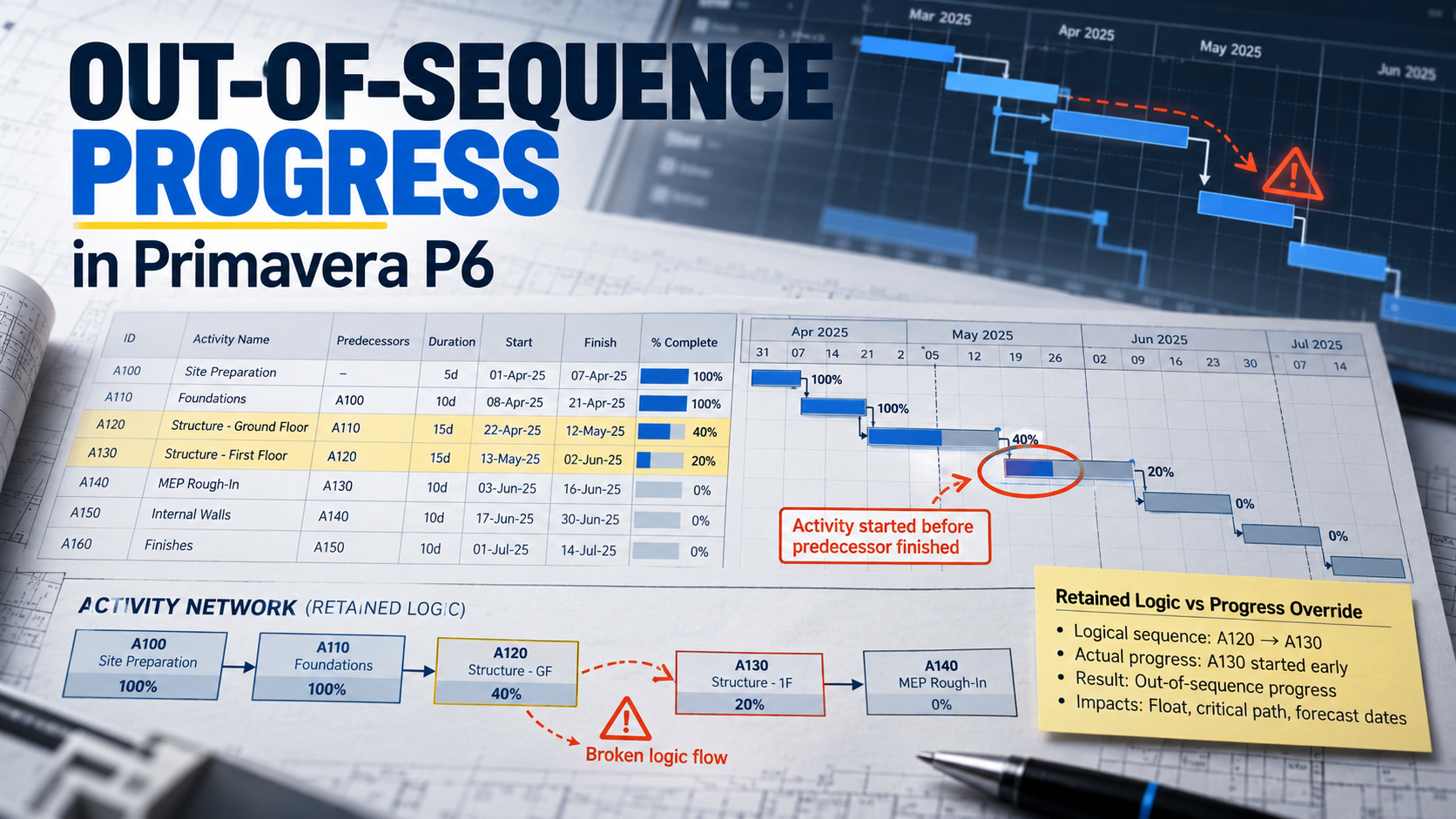
Every scheduler remembers the first update where the numbers stopped making sense. The site team reported a good month, more activities had started than planned, and yet the forecast completion date jumped three weeks to the right. Nobody on the project could explain it, and the scheduler — me, in that case many years ago — had to stand in the progress meeting and say "let me check and come back to you." That is not a good feeling.
The cause, nine times out of ten, is out-of-sequence progress: work that started before the logic in the programme said it could. On its own, out-of-sequence work is not a problem. Construction sites are not laboratories, and good superintendents find ways to get ahead. The problem is how Primavera P6 treats that work when you press F9, and whether the person running the schedule made a deliberate choice about it or simply accepted the default.
This article walks through the three P6 options for scheduling progressed activities, shows what each one does to a real-world fit-out sequence, and gives you a decision process I have used on hospitals, water treatment plants and transport projects. If you prepare or review monthly updates, this is one setting you cannot afford to leave on autopilot.
What "Out-of-Sequence" Actually Means in P6
An activity is out of sequence when it has an actual start (or progress) while one of its predecessors has not yet satisfied the relationship. With a Finish-to-Start link, that means the successor started before the predecessor finished. With Start-to-Start plus lag, it means the successor started before the lag had elapsed.
P6 does not stop you from recording this. It cannot; the dates are facts. What P6 has to decide is what to do with the remaining part of that successor. Should the remaining work still wait for the predecessor to finish, or should the broken link simply be ignored from the data date onward? That single decision is controlled by one setting, and it can move your project finish date by weeks.
★ Expert Tip. Before you change anything, tick Log to file in the Schedule dialog (F9) and read the log after every run. The section listing out-of-sequence activities is the fastest diagnostic read you will get. If you have never opened it on your current project, do it today and count the entries.
The Three Options: Retained Logic, Progress Override and Actual Dates
In P6 Professional you will find the setting under Tools → Schedule → Options → General, labelled "When scheduling progressed activities use". Retained Logic is the default. Here is how the three behave in plain terms.
| Option | What P6 does with the remaining duration | Effect on the forecast | Risk indicator |
|---|---|---|---|
| Retained Logic | Remaining work cannot resume until the predecessor finishes. The original relationship is respected from the data date. | Usually the most conservative finish date. Can stretch the successor into a long, split-looking bar. | ▲ Low risk of hidden delay |
| Progress Override | The incomplete relationship is ignored. Remaining work continues from the data date as if the predecessor were complete. | Often the earliest finish. Successors can be pulled forward, and the critical path can shorten without any real change on site. | ▼ High risk of over-optimism |
| Actual Dates | Behaves much like Retained Logic for activities in progress, but uses actual dates when out-of-sequence work has already been completed. | Usually close to Retained Logic; differences appear mainly around completed out-of-sequence work. | ● Medium; test before use |
Table 1 — Comparison of P6 scheduling options for progressed activities
Notice what is not in the table: none of these options fixes the logic. They are three different ways of interpreting a network that no longer matches what is happening on site. That distinction is the whole point of this article, and I will come back to it.
A Real-World Example: Level 2 Fit-Out on a Hospital Wing
Let me use a sequence I have seen many versions of, on a new hospital wing where the structure was complete and the fit-out trades were stacking up floor by floor. On Level 2 the planned chain was simple and fully Finish-to-Start:
- A1010 Blockwork walls L2 — 4 weeks, Weeks 1 to 4
- A1020 MEP rough-in L2 — 4 weeks, Weeks 5 to 8
- A1030 Wall boarding L2 — 3 weeks
- A1040 Ceiling grid L2 — 2 weeks
- A1050 Paint and finishes L2 — 3 weeks, finishing in Week 17
Here is what happened on site. Blockwork started on time but ran slow because of a block supply issue, and by the end of Week 5 it was only about 60% complete with two weeks of work remaining. Meanwhile the mechanical and electrical contractor, keen to protect their own programme, started rough-in in Week 3 in the zones where the blockwork was already up. By the data date they had completed roughly 40% of their scope.
Legitimate site behaviour. Sensible, even. Now look at what P6 does with it.
Figure 1 — Hospital wing, Level 2 fit-out: one out-of-sequence start, two different futures
Figure 1 — Gantt chart of the Level 2 fit-out: Retained Logic forecast (navy) versus Progress Override forecast (amber). Weeks 1–17 across the axis.
Under Retained Logic, the remaining 60% of rough-in has to wait until blockwork finishes at the end of Week 7. Every downstream trade inherits that wait, and paint and finishes land at about Week 17.4, slightly behind the baseline. Under Progress Override, P6 ignores the unfinished blockwork link, lets rough-in carry on from the data date, and paint and finishes finish around Week 15.4: two weeks ahead of baseline, on paper.
Figure 2 — Same progress data, different forecast finish
Figure 2 — Forecast finish of the last activity in the chain under each option, using identical progress data.
Two weeks of difference from one checkbox. Now ask yourself which version is true. The honest answer is: it depends on whether the rough-in crews actually need the remaining blockwork to be finished. If the remaining walls are in zones they have not touched yet, they do need them, and Retained Logic is telling the truth. If the remaining walls are in a corridor that rough-in does not rely on, the original FS link was simply too coarse, and neither option is giving you a credible forecast.
◆ Lesson Learned. On that project the client's programme reviewer asked the right question in the first five minutes: "Why did your critical path shorten in a month where you lost blockwork productivity?" The update had been run with Progress Override. Switching back to Retained Logic and splitting the blockwork activity into two zones gave a forecast the site team actually believed, and it survived the review.
Why This Matters Beyond the Gantt Chart
If this were only about bar positions, you could argue it is a matter of taste. It is not. The scheduling option touches almost every project controls output that leaves your desk.
| Area | With Retained Logic (sound logic) | With Progress Override left on by default |
|---|---|---|
| Critical path | ✔ Reflects what still physically constrains the work | ✖ Can drop real constraints and show a shorter path |
| Forecast completion | ✔ Defensible in progress meetings | ✖ Early dates that later slip all at once |
| Earned value and cash flow | ✔ Planned value follows a realistic sequence | ⚠ Front-loads forecast spend and distorts SPI trends |
| Delay analysis and EOT | ✔ Contemporaneous updates support windows analysis | ✖ Opposing experts will attack the update logic first |
| Trust with the client | ✔ Fewer “why did the date move?” conversations | ✖ Credibility drops after the first unexplained jump |
Table 2 — Project controls impact of the scheduling option
The delay analysis row deserves extra attention. Methods such as time impact analysis and windows analysis (see AACE recommended practices 29R-03 and 52R-06, and the delay analysis field guide) rely on the contemporaneous updates being reasonable. If your updates were run with an option that quietly ignored unfinished predecessors, every window built on them inherits the distortion. I have reviewed claims where half the argument was about the scheduling setting rather than the delay events.
How to Decide: A Practical Decision Process
After a lot of updates, my approach has settled into one question: does the successor still physically need the rest of the predecessor? Answer that honestly for each out-of-sequence pair, and the option choice becomes much less emotive.
Figure 3 — Decision flowchart for handling an out-of-sequence activity
Figure 3 — Decision flowchart for handling an out-of-sequence activity. Progress Override is a deliberate exception you justify in writing — never a default.
If the answer is yes, keep Retained Logic. The schedule is correctly telling you that the early start bought less than the site team thinks. If the answer is no, the relationship was wrong in the first place, and the cure is to fix the link, not to change the global option. Typical fixes include converting FS to SS with a realistic lag, splitting the predecessor by zone or level, or re-tying the successor to the specific part of the work it truly depends on.
★ Expert Tip. Treat Progress Override as a deliberate exception that you justify in writing, never as a default. If you do use it, say so in the update narrative, list the affected activities, and explain why the logic was no longer valid. A reviewer who sees that paragraph will usually accept it. A reviewer who discovers it on their own will not.
A Monthly Update Routine That Keeps Out-of-Sequence Under Control
The real fix is not a setting. It is a habit inside your update cycle. This is the sequence I use and teach, and it adds perhaps forty minutes to a typical monthly update.
- Back up the project and keep the previous update as a named copy for comparison.
- Enter actuals (actual start, actual finish, remaining duration, percent complete) as of the data date, not as of the day you happen to be typing.
- Schedule with Log to file ticked and open the log. Export the out-of-sequence list to Excel.
- Walk the list with the site lead. For each pair, ask the physical dependency question.
- Repair logic where needed: split activities, adjust relationship types, add the missing intermediate activity.
- Reschedule and compare with the previous update using Claim Digger or your comparison tool. Explain every critical path change.
- Write the narrative: number of out-of-sequence activities, what was fixed, and which option was used.
When teams adopt this routine, the out-of-sequence count tends to follow the pattern below. It climbs fast while nobody is looking, then falls quickly once someone owns it every month.
Figure 4 — Out-of-sequence count across 12 monthly updates (typical pattern)
Figure 4 — Typical pattern of out-of-sequence activities before and after a monthly logic review is introduced.
| Health indicator | ● Green | ▲ Amber | ▼ Red |
|---|---|---|---|
| Out-of-sequence activities (% of in-progress) | < 5% | 5–15% | > 15% |
| Unexplained critical path changes per update | 0 | 1–2 | 3 or more |
| Option used documented in the narrative | Always | Sometimes | Never |
| Logic repairs logged | Every update | Quarterly | Not tracked |
Table 3 — A simple RAG checklist for out-of-sequence health (practitioner thresholds, not a formal standard)
Those thresholds are my own working rules, not a published standard. The DCMA 14-point assessment, for example, does not score out-of-sequence progress directly, although it does score missing logic, hard constraints and high float, which are often the root causes. Many owner specifications, however, ask for the scheduling log with each update, so expect a reviewer to read it even if you do not.
✖ Common Mistakes
- Accepting the default without knowing it exists. Retained Logic is the default, but many templates and imported XER files arrive with Progress Override already set. Check it on every project you inherit — especially one that came through a schedule conversion from MS Project.
- Switching options to make a date look better. If the finish improves only because you changed a setting, the project did not improve. Reviewers spot this quickly.
- Leaving long, single activities for multi-zone work. One "Blockwork L2" activity for an entire floor practically guarantees out-of-sequence progress.
- Fixing the symptom with constraints. A Start On constraint on the successor hides the logic problem and fails a DCMA hard-constraints check.
- Not telling anyone. Changing logic or options without recording it in the narrative undermines every future delay analysis built on that update.
Where Each Option Actually Belongs
There is an old forum rule of thumb that Retained Logic suits buildings and Progress Override suits linear infrastructure such as roads. There is a grain of truth in it, because linear work often has looser physical dependencies. But I would not adopt it as a rule. I have seen highway schedules where Progress Override hid a real dependency between drainage and pavement, and building schedules where Retained Logic stretched a fit-out activity across months because the original link was simply wrong.
| Situation | Preferred approach | Why |
|---|---|---|
| Contractual monthly updates on a lump-sum project | Retained Logic + logic repair | Defensible, conservative, supports later EOT assessment |
| Early-works or design phase with fluid sequencing | Retained Logic, review monthly | Logic is still evolving; repair is cheap at this stage |
| Linear works with genuinely independent fronts | Fix the logic by chainage | Splitting by section removes the need for Progress Override |
| Short-term what-if or recovery scenario | Progress Override on a copy | Useful as a sensitivity test, not as the submitted update |
| Forensic reconstruction of past updates | Use what was used contemporaneously | Changing options after the fact invites challenge |
Table 4 — Matching the approach to the project situation
A Short Story About Actual Dates
Actual Dates is the option most schedulers never touch, and I understand why: Oracle's explanation of it is brief, and its results usually sit close to Retained Logic. Where it becomes interesting is when an out-of-sequence activity has already finished. On a wastewater pump station I reviewed, the valve chamber had been completed ahead of the wet well it was logically tied to. Under Retained Logic the successor of the valve chamber kept waiting for the wet well; under Actual Dates the completed work released its successor earlier. Neither answer was wrong in the abstract. The question again was physical: could the pipework crew actually proceed? They could, so the right fix was a relationship change, documented, rather than a global switch.
★ Expert Tip. Whenever you are unsure, run the same update three times on copies, one per option, and compare the finish dates and critical paths side by side. If all three agree, your logic is healthy. If they diverge widely, the divergence itself is telling you where the logic needs repair.
✔ Key Takeaways
- ✔ Out-of-sequence progress is normal on real sites; ignoring how P6 handles it is not.
- ✔ Retained Logic is the safest default for contractual updates because it respects unfinished physical dependencies.
- ✔ Progress Override can shorten the critical path without any real improvement on site. Use it only as a documented exception.
- ✔ The best fix is almost always better logic: split activities by zone, use SS with realistic lags, and add missing intermediate work.
- ✔ Make the schedule log, an out-of-sequence review and a written explanation part of every monthly update.
Related career guides and references
If you are new to P6 update mechanics, the Primavera P6 Step by Step — 2026 Edition tutorial and the Riverside P6 tutorial build the habits this article assumes. For the forensic side, see how we fixed −19 days of negative float and the delay analysis field guide. The encyclopedia entries on the critical path method, float management, baseline schedule and data date give concise technical definitions of every term used here.
Frequently Asked Questions
What is out-of-sequence progress in Primavera P6?
It is progress recorded on an activity before its predecessor relationship has been satisfied — for example a Finish-to-Start successor that started while the predecessor was still in progress. P6 records the dates, then uses your chosen scheduling option to decide how the remaining work is scheduled.Which is better, Retained Logic or Progress Override?
For most contractual updates, Retained Logic is the safer choice because it keeps unfinished dependencies in force. Progress Override can be appropriate when the original logic genuinely no longer applies, but the better practice is to correct that logic directly and document it.Where do I change the setting in P6 Professional?
Open the Schedule dialog (F9), click Options, and on the General tab find the setting for scheduling progressed activities. Choose Retained Logic, Progress Override or Actual Dates. The setting is saved per project, so check it on every project you open.How do I find all out-of-sequence activities?
Tick Log to file in the Schedule dialog, run the schedule and open the log. It lists the out-of-sequence activities with their predecessors. Export the list and review it with the site team as part of each update.Does out-of-sequence progress affect delay claims?
Yes. Contemporaneous updates are the foundation of most delay analysis methods. If the updates were run with an option that ignored real dependencies, or with unrepaired logic, the analysis built on them is easier to challenge.Is out-of-sequence progress part of the DCMA 14-point assessment?
Not as a separate metric. However, the root causes — missing logic, hard constraints and unrealistic relationships — are covered by several DCMA checks, and many owner specifications separately require the scheduling log with each update.Should I change the option in the middle of a project?
Avoid it if you can. If a change is unavoidable, make it at a data date boundary, run the update both ways once, record the difference in the narrative, and keep the setting consistent afterwards.
People also ask
Follow-up questions practitioners search for next — each one points to the calculator, template or reference entry that answers it.
Which academy track maps to this career step?
Structured progression from planner to programme controls director. Project Controls Academy ↗
Which calculator should I learn first?
PV / EV / AC / CV / SV / CPI / SPI in one workbook — the gateway tool. EVM Calculator ↗
Which schedule tool will an interviewer expect me to know?
Runs the DCMA 14-point assessment against P6 / MS Project exports. Schedule Health Checker ↗
Where do I look up the terms in this guide?
Single-line definitions for 1,200+ project-management and controls terms. PM Glossary on PMMilestone.org ↗